

14/05/21 Campus
- samratnembang
- May 19, 2021
- 2 min read
This day, there was only one goal and that was to turn that raw animation into a fully polished animation. However, I got a problem when I tried loading my Premiere Pro project in the campus computers. My project couldn't be loaded up since it was edited in the newest version of Premiere Pro and campus had the one below it. I told Kat this and she recommended me seeing if other computers around the school had the version I had. None of them did. I told Kat "it's fine because I haven't edited much". Then she told me to meet Simon who was replacing Jordan for today. I think meeting Simon was huge progress.
I told Simon what happened to my project file in the morning, what I needed help with? which was mostly getting rid of bluescreen. This led to me learning about After Effects. He explained me a lot about the power of After Effects. I remembered him telling me that Premiere Pro is great for film but for editing out stuff and moving a lot of stuff use After Effects.
When we looked at this bluescreen, Simon told me about an effect called colour range that you can select colours on the blue screen to remove it. Frame by frame I was clicking blue screen colours. another effect was rotoscoping and that was by using the pentool or rotobrush to mask out everything. We did this on the scissors that would appear. All was well but we clearly saw that some of the colours of my characters were getting picked up by the colour range effect. I sighed and in my head I didn't want to rotoscope frame by frame my character. I said "Lets just see it with the background". We looked at it with the background and I remembered we both agreeing it looks decent. I liked the shabby and half hearted effort on the greenscreen as it complimented the surreal and changing background. Another thing, I killed two birds with one stone as I didn't have to worry about the egg hatching scene where my peers were telling me to watch out for.

After all this momentum around After Effects. I decided to complete my animation on After Effects rather than Premiere Pro. Simon guided me with some things such as extending the timeline but at the end he told me "I think you got the hang of After Effects" than let me complete the work as he needed to go somewhere.
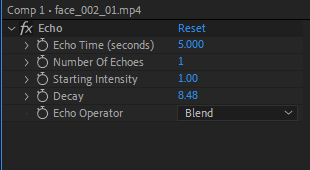
After checking back and forth from my old works, I quickly compiled everything and started editing. The majority of the times using the Sharpen Effect to give this grainy textured feel on my drawings. I used a new effect called Echo that I seen previously in a Tiktok where it duplicates a video. It reminded me of Pas de Deux.
At the end my composition looked something like this:

Comments